👤 Your Account: What’s Changing
✅ Multi-Factor Authentication (MFA)
We’re upgrading how you log in to make your account more secure.
What’s new:
- Text message codes will no longer be used.
- You’ll now use the Microsoft Authenticator app on your phone.
- The app will show where the login request is coming from and ask you to enter a PIN to confirm it’s really you.
This helps protect against fake login attempts (MFA fatigue).
🌍 Geographic Sign-In Alerts
Traveling internationally? Let us know ahead of time.
What to do:
- Notify the Eclipse Service Desk at least 1 week before international travel by emailing us at servicedesk@eclipse-networks.com
- Please include dates and location of your travel ***IMPORTANT***
- If you don’t, your account might get locked for suspicious activity outside the U.S.
⏱ Session Management
This affects how long you stay signed in.
What to expect:
- If you use the Outlook app, you’ll only need to sign in again every 30 days.
🕵️ Advanced Login Monitoring
We’ll be watching for unusual activity to protect your account.
Examples that may trigger a support ticket:
- Logging in from two different places within 15 minutes
- Too many failed login attempts
- Not signing in for 45+ days
- Signing into multiple devices right after a password change
⏳ Tip: Wait 15 minutes before signing in on a second device after changing your password.
✅ For more help, check out the Comprehensive Guide for Microsoft 365\SaaS Alerts and Microsoft Authenticator MFA User Guides or contact the Service Desk.
📧 Email Security: What’s Changing
✉️ Email Filtering & Protection
We’ve added new protections to help stop dangerous or suspicious emails before they reach you.
What’s included:
- Protection against phishing, malware, and unsafe links/attachments
- Suspicious emails are quarantined (you’ll get a notice if this happens)
- External forwarding is now blocked for added security
- Emails with sensitive info will alert you, but still be delivered

🌐 Dark Web & Cyber Awareness
🔎Dark Web Monitoring
- We continuously monitor the dark web for any leaked company info (like passwords or email addresses).
- If your info is found: A Service Desk ticket will be created for follow-up.
🎓 Cybersecurity Awareness Training
- You’ll get monthly training via email (sent within the first 2 weeks of each month)
- Expect simulated phishing emails to test awareness
If you click or report them, it’s tracked to help improve training.
💻 Your Computer: What’s Changing
🛑 Application Control
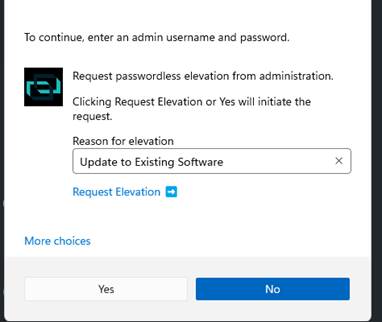
- If you try to install something not on the approved list, you’ll see a pop-up, and our Service Desk will be notified via ticket.
- If you need something quickly, just call the Service Desk for help.
✅ Eclipse Networks manages the list of approved applications.
🔑 1Password Deployment
To help you securely manage your passwords, we’re rolling out 1Password — a trusted password manager for storing and protecting your login information.
What to expect:
- You’ll receive an email with instructions to activate your 1Password account.
- Your POC will help manage the rollout and assist if you need support.
- 1Password will be automatically installed for licensed users.
- In Microsoft Edge, the browser extension will activate on its own.
- Chrome users must install the extension manually via the Chrome Web Store.
✅ For more help, check out the 1Password User Guide or contact the Service Desk.
📌 Have Additional Questions?
📞 Call: 770-399-9099 x1
📧 Email: servicedesk@eclipse-networks.com