🔐 Core Email Security Features
Anti-Phishing Protection
- Blocks impersonation and suspicious senders using Microsoft threat intelligence and AI to detect phishing patterns.
- Tip: Regularly review impersonation settings in Microsoft Defender to ensure VIP users and domains are protected.
Anti-Malware Scanning
- Scans email attachments and links for known threats using advanced detection tools.
- Tip: Avoid opening attachments from unknown senders; ensure endpoint protection is also enabled.
Safe Links & Safe Attachments
- Safe Links: Automatically checks links in emails for safety before you click them.
- Safe Attachments: Opens attachments in a secure environment to check for threats before they reach your inbox.
- Tip: Teach users to pause and look at links before clicking, and to report any suspicious emails.
Spam Filtering
- Blocks unwanted and junk emails using Microsoft’s security tools.
- Tip: Regularly check your Junk Email folder and move any real emails back to your inbox. This folder may catch important messages from Graphus and Microsoft.
Impersonation Protection
- Stops fake emails pretending to be from executives or your company.
Email Authentication (SPF, DKIM, DMARC)
- SPF: Verifies that the sender is allowed to send emails for your company.
- DKIM: Adds a digital signature to verify the email hasn’t been altered.
- DMARC: Combines SPF and DKIM results and sends reports about suspicious emails.
🌍 Travel and Location Alerts
Why it matters: Logging in from a new country can look suspicious and may trigger security blocks to protect your account from unauthorized access.
Travel Steps:
- Tell us at least 1 week before you travel. This lets us temporarily allow logins from the countries you’ll visit.
- If you don’t notify us:
- Your account may be locked for safety.
- All active sessions will be closed.
- A support ticket will be created to review the issue.
If your account is locked, just contact the Eclipse Networks Service Desk to regain access.
🔁 Login Monitoring & Session Rules
Multiple Logins:
- If multiple logins happen from different locations within 15 minutes, our team is notified to check for any issues via an automated service ticket.
- Tip: After changing your password or using a new device, wait 15 minutes before logging in on multiple devices.
Regular Sign-Ins:
- Every 30 days, you’ll be asked to sign in again on mobile and desktop apps.
- This helps keep your account secure and prevents unauthorized access.
🚨 Important Security Alerts
We watch for signs of unusual activity, like:
- Multi-factor authentication (MFA) being turned off
- 5 failed MFA login attempts in 15 minutes
- Accounts not used for over 45 days (including shared mailboxes)
When this happens, our team is notified via a service desk ticket to review and help.
Tip: Instead of logging in directly to shared mailboxes, use delegated access for better security.
📤 Data Loss Prevention (DLP)
What It Does:
- Automatically detects emails containing sensitive information like Social Security numbers or bank details.
- Sends a notification to the sender to alert them about the sensitive content in their email.
What You Should Do:
- Use OneDrive to Share Files: Instead of sending sensitive files directly, share them via OneDrive links. These links automatically expire after 30 days for added security.
- Send Encrypted Emails: Use email encryption to protect sensitive information when sending it.
Helpful Resources:
- How to send encrypted emails:
- How to share files and folders using OneDrive:
📥 Email Quarantine Procedures
What is Email Quarantine?
Sometimes, Microsoft Defender or Graphus will flags emails that might be harmful or spam and holds them in a safe place called the quarantine.
How to Access Quarantined Emails:
You can check Microsoft’s quarantined emails anytime by visiting https://security.microsoft.com/quarantine. It’s a good idea to review this regularly to find any important emails that were mistakenly blocked.
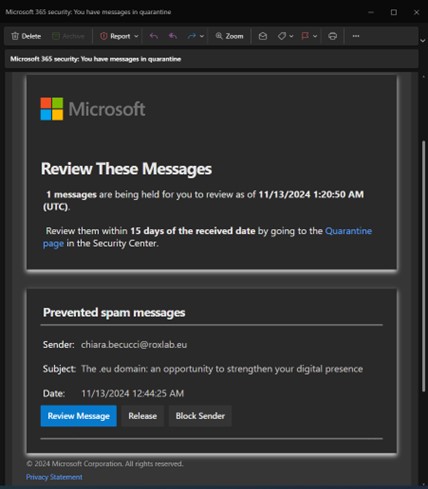
Quarantine Notification Message:
If an email is placed in quarantine, you’ll get a notification in your inbox with these options:
- Review: See a safe preview of the email in the quarantine portal.
- Release: Move the email from quarantine to your inbox without waiting.
- Block Sender: Stop emails from this sender from reaching you in the future.
- Do Nothing: Leave the email in quarantine. It will be automatically deleted after 15 days.